Solution
Industries
Playbooks built for how you actually sell.
Industries
See all industry playbooks.
Med Spa
Rebooks, re-engagement, no-shows, reviews.
Marketing Agency
Multiple brands, one login, clean isolation.
Coaches and trainers
Consults booked, better attendance
View all industries
Platform
What Tarvent does.
Email Marketing
Campaigns plus reporting.
Marketing Automation
Journeys that run themselves.
Transactional Email
Receipts, alerts, system mail.
Email API
Send transactional email via API.
View platform overview
Features
Feature spotlights
The stuff competitors avoid talking about.
Engagement System
New
Score attention. Get next steps.
CRM Integrations
Sync contacts. Trigger journeys.
Smart Filters
Targeting that is ready to use.
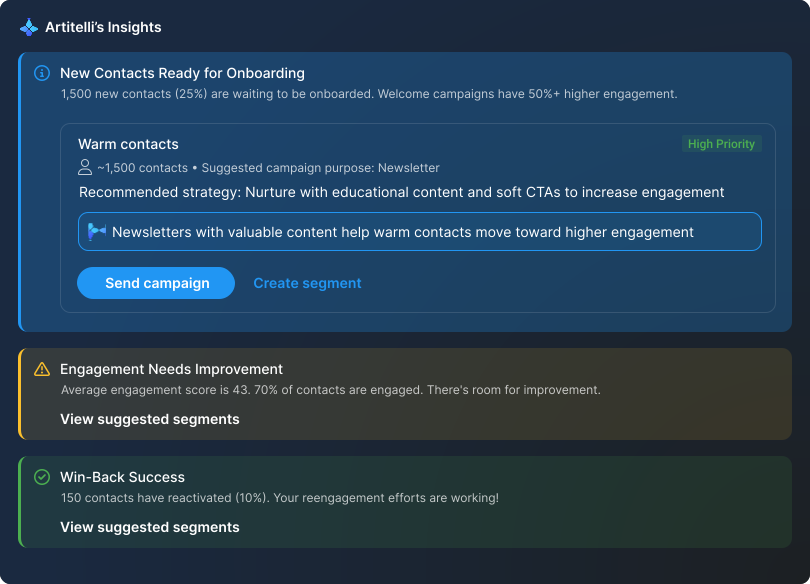
Artitelli
Your marketing navigator.
View all features
Core features
Everything you need. None of the clutter.
Journeys
Campaigns plus reporting.
Campaigns
Send newsletters and promotions.
Landing pages
Capture leads with clean pages.
Forms
Signup, profile, unsubscribe, more.
Segmentation
Target by behavior and data.
Personalization
Merge tags and formatting functions.
Detailed reporting
Clear reporting across everything.
A/B testing
Test up to 10 combinations.
Email API
Send transactional email via API.
Explore Email Marketing
Pricing
Integrations
Pricing
Integrations
Resources
Blog
Learn about the latest trends, marketing tips, and more in our blog.
Affiliate program
Become an affiliate and start earning today.
Knowledge base
Learn how to set up and use Tarvent.
Roadmap
See what we're up to and submit feature requests.
Developer docs
Learn how to use our API.
Tarvent YouTube
Check out our live webinars, how-to videos, and more.
Schedule a demo
Log In
Log In
Schedule a demo
Start for free
Your CRM finally knows
what your email is doing.
Sync contacts and fields. Trigger journeys from pipeline changes. Push engagement back to sales. No duct tape. No weekly CSV rituals.
Start for free
Schedule a demo
See the engagement system
•
Explore industries
Two tools.
One contact truth.
Before
Two isolated universes
Email marketing lives somewhere else. Sales guesses. Marketing hopes. Somebody opens a spreadsheet.
After
One connected system
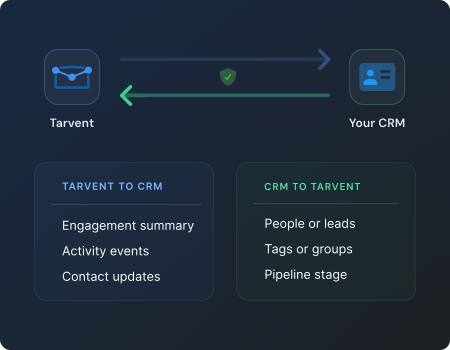
Your CRM and Tarvent stay in sync. Journeys react to pipeline changes. Sales sees engagement without leaving the CRM.
If your CRM is the source of truth, Tarvent will respect it.
Everything you want from an integration,
without the drama.
Connect your CRM to a Tarvent audience, map fields, pick your sync rules, and let automation do the boring parts.
Contact sync that stays synced
Near real-time updates, plus manual sync whenever you want.
Field mapping that handles real life
Standard and custom fields, required fields, and sane defaults.
Authority rules that prevent sync chaos
Decide which system wins when values conflict.
Journeys that can act inside your CRM
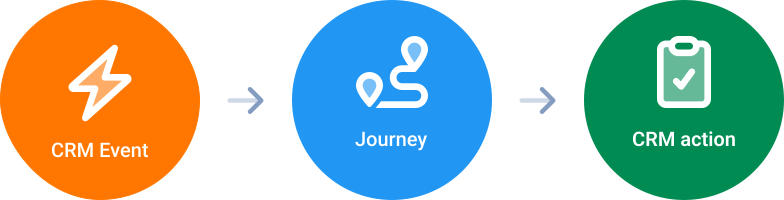
Trigger from pipeline activity and push actions back to sales.
This is not “we sync contacts.” This is marketing that reacts to your pipeline.
Sync direction matters.
Pick the right one.
Choose your approach:
Two way
One-way
Either way, updates flow in near real-time, and you can run a manual sync anytime.
One audience. One CRM connection.
That is by design. Cleaner mapping and fewer surprises.
When the pipeline moves,
marketing moves.
This is where CRM integrations stop being a checkbox and start being a system.
Less Annoying CRM
Triggers
Pipeline item created or updated
Actions
Add pipeline item
Update pipeline item
Add task
Add note
View Less Annoying CRM journey actions
Copper
Triggers
Opportunity created or updated
Actions
Add opportunity
Update opportunity
Add task
Add note or activity
View Copper journey actions
No pipeline or opportunity? Journeys can also trigger from profile updates, forms, and page activity.
Sales should not have to ask, “Are they engaged?”
Engagement scoring tells you who is paying attention. Your CRM tells you who is most valuable. Put them together and your next action becomes obvious.
Engagement summary fields
Choose the detail level:
None
Basic
Detailed
Includes engagement score, engagement level, trend indicator, lifecycle stage, and key timestamps.
Activity sync
Pick the mode:
None
Recent event
- recommended
Full history
- use with caution
Critical events like hard bounces, complaints, and unsubscribes sync immediately.
We avoid spammy CRM timelines. You get signal, not noise.
See the Engagement System
See engagement reports
Integrations that feel like
part of Tarvent.
Start with the CRM you already use. We will do the syncing and the automation.
Less Annoying CRM
The simple CRM that actually stays simple.
Near real-time contact updates
One-way or two-way sync
Group syncing supported
Custom field mapping and authority rules
Pipeline triggers and CRM actions inside journeys
Engagement and activity sync into the CRM
View setup guide
View journey actions
View engagement and activity sync
Copper
CRM for teams that live in Google Workspace.
Near real-time contact updates
One-way or two-way sync
Custom field mapping
Opportunity triggers and CRM actions inside journeys
View setup guide
View journey actions
More CRM integrations are on the way. If your CRM matters,
tell us which one
.
Connect in minutes, not in “we will circle back.”
Setup is simple, guided, and consistent. Once connected, Tarvent keeps your data in sync automatically so you can focus on marketing, not maintenance.
1
Confirm your audience
Most accounts only have one. Choose if needed.
2
Connect securely
Sign in safely and authorize the connection.
3
Review your fields
Confirm how your data lines up between systems.
4
Set your sync rules
Choose how updates and conflicts are handled.
5
Start syncing
Turn it on and keep your data up to date automatically.
Once connected, Tarvent keeps your data in sync automatically, so your team spends less time on manual updates.
Where to go next.
Learn more about Tarvent and how the engagement system works.
Engagement System
Know who to email, automate the rest.
Explore engagement system
Industries
Playbooks for Med Spas and Marketing Agencies.
Explore industries
Make your CRM and marketing work like a team.
One plan. Fast support. Engagement that tells you what to do next.
Start for free
Schedule a demo
Support under 30 minutes
Everything Plan
Support replies in under 30 minutes during business hours.





%201.svg)


